
Tailwind and React are two leading technologies in their sphere. Tailwind CSS simplifies the concept of Atomic CSS, enabling developers to style their UI by adding some classes to their markup. And with the performance improvements that come with the new JIT compiler, Tailwind CSS has become a clear developer’s favorite.

Vite also simplifies the bundling process but takes a different approach than traditional bundlers. Vite gives us instant dev sever start times and ultra fast bundling by leveraging native JavaScript modules and esbuild under the hood.
Both Vite and Tailwind CSS excel in simplicity, performance, and developer experience.
As software becomes more sophisticated to meet the needs of end users, app size increases linearly and leads to a demand for faster development tools and bundlers. Although Create React App works well, as the app size increases, its performance declines. This is where Vite comes in.
In this article, we’ll learn about Vite and how to set up a React and Tailwind CSS application using it.
The Replay is a weekly newsletter for dev and engineering leaders.
Delivered once a week, it's your curated guide to the most important conversations around frontend dev, emerging AI tools, and the state of modern software.
Historically, JavaScript did not have an API for developers to write code in a modular way. This is because JavaScript was originally designed for small browser scripts.
Over the years, JavaScript has become wildly popular and is used in different aspects of programming. However, its main drawback has been its lack of modularity. This has led JavaScript developers to come up with different ways of creating modules, such as:
(function () {
// declare priate variables and/or functions
return {
// declare public variables and/or functions
})();
The problem is that not all module specifications work in the browser. For example, CJS supports only server-side module declaration. Additionally, building a modern web application involves the use of some libraries and packages that are not supported by the browser, like React, Vue, TypeScript, etc.
This problem, however, is solved by the concept of bundling. The process involves using a bundler (intuitive, right?) to combine all our app’s files and assets into a single package that works in the browser. This has led to the development of traditional bundlers such as webpack, Parcel, and Rollup.
There are two main issues with these: slow cold start of the dev server and slow updates. Next generation JavaScript build tools, like Vite, identify and solve these issues for us.
Vite is the French word for fast. It’s is a modern build tool for frontend web development that leverages ES modules, or ESM. Vite features a leaner and faster bundler that comes with a preconfigured dev server.
As an ESM bundler, Vite solves the problems of traditional bundlers mentioned above. We’ll walk through a few key differentiators below.
Unlike webpack, Vite starts the dev server immediately when we cold start our application, as seen below:
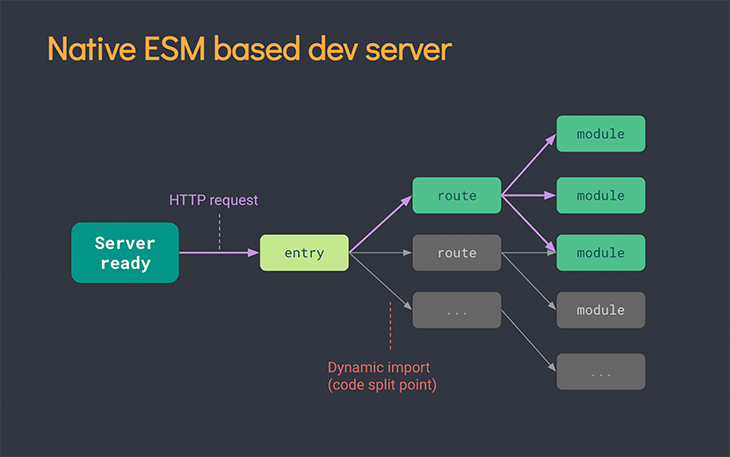
Vite can cold start the dev server instantly because of the following factors:
When compared to traditional bundlers like webpack, Vite takes a different approach in the implementation details of its bundling process. traditional bundlers like webpack rebuild the whole app on each update. The main problem with this is that it can get very expensive.
To address this issue, these bundlers use a technique called Hot Module Replacement, or HMR. HMR is a way of updating the changed modules in a running application so you don’t have to update the rest of the page.
However, the update speed of HMR decreases linearly as the app size grows.
Since Vite uses ESM, it performs HMR over ESM. This enables Vite to only invalidate the chain between the updated module and its closest HMR boundary when a module is updated. Thus, HMR in Vite is consistently fast regardless of the size of the application.
Vite uses the browser to speed up full page reloads by leveraging HTTP headers. It handles cache dependency module requests via Cache-Control: max-age=31536000, immutable, so they don’t hit the server again.
Lastly, source code module requests are made conditional via 304 Not Modified.
All these give Vite a significant performance advantage over bundle-based build tools.
Another major difference between Vite and traditional bundlers is the handling of code splitting. Traditional bundlers like webpack and Rollup produce common chunk — code that is shared between two or more other chunks. This, when combined with dynamic import, can lead to multiple network round trips as shown below:
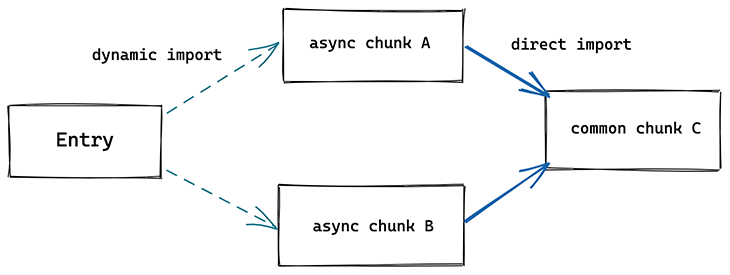
As shown in the image, in unoptimized scenarios when async chunk A is imported, the browser has no way of figuring out it needs common chunk C without first requesting and parsing A. And after it figures out it needs common chunk C, it then imports it, leading to an extra network round trip.
Vite implements the code split dynamic import calls in a different way that adds a preload step. This way, when chunk A is requested, chunk C is fetched in parallel. This completely eliminates network round trips.
When compared with Create React App, Vite outshines it in terms of performance for the reasons listed above. Although both are Node.js applications that can ultimately achieve the same thing, the one drawback with Create React App is its performance.
While Create React App works only for React, Vite is framework agnostic and supports a lot of libraries and frameworks out of the box.
In the next section, we’ll learn how to work with Vite by scaffolding a React application with Vite.
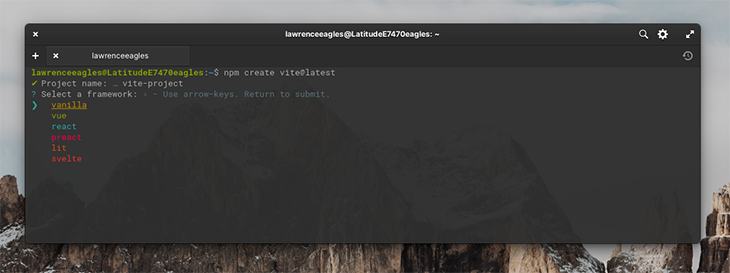
To scaffold a project, run the following code from your terminal:
npm create vite@latest
Choose a project name and select a template. Follow the on-screen instructions to complete the setup, as seen below:
Alternatively, we can select a template by using the — template flag in the CLI, as seen in the code below:
# npm 6.x
npm create vite@latest my-vue-app --template vue

# npm 7+, extra double-dash is needed:
npm create vite@latest my-vue-app -- --template vue

# npm 6.x
npm create vite@latest my-react-app --template react

# npm 7+, extra double-dash is needed:
npm create vite@latest my-react-app -- --template react
Next, install the app dependencies and start the dev server by running:
# Installs dev dependencies
npm install

#Starts dev server
npm run dev
And we get:
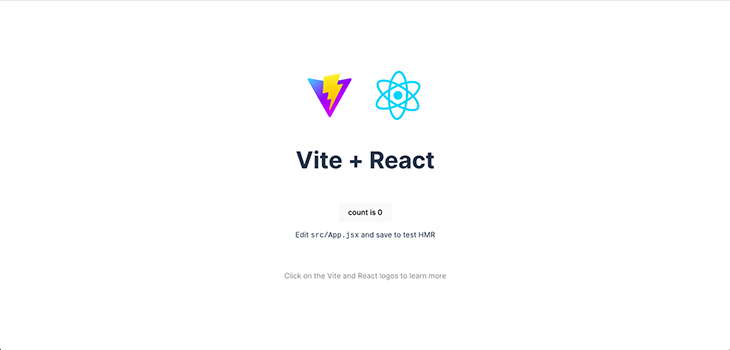
Now we will integrate Tailwind CSS. The most seamless way to do this is to use postCSS by following the steps below:
First, install Tailwind CSS and its peer dependencies by running:
npm install -D tailwindcss postcss autoprefixer
Next, create your tailwind.config.cjs file by running:
npx tailwindcss init
Add Tailwind to your postCSS configuration. To do this, create a postcss.config.cjs file and add the following code:
module.exports = {
  plugins: {
    tailwindcss: {},
    autoprefixer: {},
  }
}
Vite automatically applies all valid postCSS configuration in the postcss.config.cjs object to all imported CSS.
Configure your template paths by modifying the tailwind.config.cjs file as seen below:
module.exports = {
  content:["./src/**/*.{js,jsx}"],
  theme: {
    extend: {},
  },
  plugins: [],
}
Add the Tailwind directives to your CSS by replacing the code of your index.css file with the following code:
@tailwind base;
@tailwind components;
@tailwind utilities;
Now, run the build process by running npm run dev. You can see that Tailwind CSS styles have been applied.
To see this in action, we can apply some Tailwind CSS classes to the counter app.
In the src directory, create a components directory.
In the components directory, create a Counter.jsx component with the following code:
import React, { useState } from "react";
const Counter = () => {
    const [count, setCount] = useState(0)
    return (
        <div className="flex h-screen">
            <div className="m-auto">
                <div className="text-6xl text-red-600">{count}</div>
                <button className="px-6 py-2 rounded bg-green-800 hover:bg-green-600 text-white" type="button" onClick={() => setCount((count) => count + 1)}>
                    count+
                </button>
            </div>
        </div>
    )
}
export default Counter;
Now replace the App.jsx component with the following code:
import Counter from './components/Counter'

function App() {
  return (
    <div>
      <Counter />
    </div>
  )
}
export default App;
Now, we get:

And this confirms that we have successfully bootstrapped our application with Vite, React, and Tailwind CSS!
In this article, we learned about Vite and how it works. We compared Vite with traditional bundlers like webpack and saw that Vite has some clear performance advantages, as well as learned how to work with Vite by bootstrapping a React and Tailwind application.
By following this, I do hope you are ready to give Vite a try in your next React application.
Install LogRocket via npm or script tag. LogRocket.init() must be called client-side, not
server-side
$ npm i --save logrocket

// Code:

import LogRocket from 'logrocket';
LogRocket.init('app/id');
// Add to your HTML:

<script src="https://cdn.lr-ingest.com/LogRocket.min.js"></script>
<script>window.LogRocket && window.LogRocket.init('app/id');</script>

Discover five practical ways to scale knowledge sharing across engineering teams and reduce onboarding time, bottlenecks, and lost context.

Discover what’s new in The Replay, LogRocket’s newsletter for dev and engineering leaders, in the March 4th issue.

Paige, Jack, Paul, and Noel dig into the biggest shifts reshaping web development right now, from OpenClaw’s foundation move to AI-powered browsers and the growing mental load of agent-driven workflows.

Check out alternatives to the Headless UI library to find unstyled components to optimize your website’s performance without compromising your design.
Hey there, want to help make our blog better?
Join LogRocket’s Content Advisory Board. You’ll help inform the type of content we create and get access to exclusive meetups, social accreditation, and swag.
Sign up now


 Learn more →






3 Replies to "Setting up a dev environment with React, Vite, and Tailwind"
Nice article.
Please review your tailwind.config.js file…
You still need to add index.html into the content array.
Vite injection point is index.html which is not inside the src folder like react did theirs..
Great work!
It seems that in this tutorial the “type” in package.json gets set to “module” which is in direct conflict with the config.js files of postcss and tailwind as they use the “require” syntax.
When running the appications it exits with an error because of that. Only solution I found was to remove the “type” in package.json. Not sure, if this is a good solution though.
Very nice article. I found it very useful and informative.
There was an error when creating the postcss.config.js file and the error was thrown because the name should be postcss.config.cjs and not .js. I just wanted to point it out for anyone that might find it useful.